How to take Snapshots

Snapshots are easy and a lot of fun to do in SSBB. You can take these snapshots for any reason, you may pause the game in a funny situation or when something unexpected happens like sending out the rare pokemon, Celebi. But how do you take these snapshots? Below is a guide that I have created to solve that question. Enjoy!
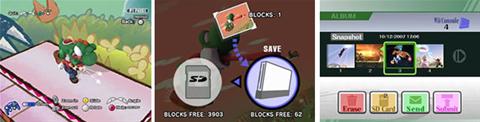


Step 1.

At any time during the game you want to take a snapshot, just pause the game.

Step 2.

Now, you are able to change the angle, zoom in and out on the subject with the controller in use's buttons.

Step 3.

Once you are happy with what you are seeing, press the designated button on your choice of controller to take that snapshot!

Step 4.

Once you have taken the snapshot, you have to save it. There are two options where to save it, the first is to the Nintendo Wiis internal memory bank, and the second is to an SD Card that you can insert into the front of the Wii.

Step 5.

After you have saved the snapshot to your chosen location, you are able to continue what you were doing. Once you have finished that, you can then view your snapshot.

Step 6.

To view your snapshot, you must go into the Vault, then into Album. This will show you all the snapshots that you have saved. In here, you are able to delete the snapshot if you no longer want it, or transfer it to an SD Card (that is if you have saved it to the Nintendo Wiis memory bank) or you can submit it to Nintendo so they are able to post the snapshots on their sites.

To Upload it to the MySSBB Snapshot Section, simply move your snapshot from SD card to the computer. Either via a SD Card input, or insert it into a Camera and use its USB Cord to transfer to the computer for upload.


So that concludes my guide to taking snapshots on Super Smash Bros Brawl. I hope you all enjoyed it and start taking your own snapshots!

submit to digg

202 Views 13 Votes
Join MyWii to vote
MrWii 16/04/2008
Kudos: 2978  Mates: 76
 

Super Smash Bros. Brawl - Full MyWii Game Profile

Super Smash Bros. Brawl News

N64 Super Smash Bros Coming to Japanese Virtual Console
ICC_06 29/12/2008 41 Comments 29 Votes
MySSBB Snapshot Competition Winners!
jotendo 16/07/2008 27 Comments 40 Votes
Brawl Sequel may be Considered by Sakurai
ICC_06 06/07/2008 56 Comments 60 Votes

Super Smash Bros. Brawl Discussions

WIFI WAR II & Captain Falcon Side Tourney - JULY 4 2009
emery 7 hours 149 Posts 1,866 Views
Melbourne Brawl | STIGMA-B on Sunday 28th of June
bylim5 21 hours 51 Posts 620 Views
|QLD| *Insert witty name* Tournament (04/07/09)
Dino063 1 day 29 Posts 405 Views

Super Smash Bros. Brawl Guides

Super Smash Bros. - Series Guide
MrWii 21/06/2008 30 Comments 63 Votes
Super Smash Bros. Brawl Australian Unboxing
MrWii 20/06/2008 62 Comments 57 Votes
Super Smash Bros. Brawl Preview
MrWii 17/04/2008 18 Comments 42 Votes

Super Smash Bros. Brawl Reviews

Super Smash Bros Brawl - The game with a smash! - 10/10
inuyasha09 10/02/2008 61 Comments 65 Votes
Super Smash Bros Brawl - 10/10
jackoltene 03/03/2008 35 Comments 64 Votes
Super Smash Bros. Brawl: The Brawl to End it All!!! - 10/10
BlakKnight 10/03/2008 12 Comments 21 Votes

Super Smash Bros. Brawl Videos

Comments

Matteh
Kudos: 28,367
Mates: 198
oh wow this the guide i wrote!

i hope it helped everyone and that you take lots and lots of snapshots!

=D

edit: when you take the snapshot, make sure yo upload it to this site so we can all look at the great shots you have taken!
Mega Man 9
turkey682
Kudos: 2,707
Mates: 169
i didnt know people take pictures of the pokemon they get out of the pokeballs
i just watch them and forget to take pictures
ill do that now
thanks
euro2008
Kudos: 11,793
Mates: 130
Good guide thanks
Sonic Unleashed
boxhunter
Kudos: 5,101
Mates: 142
For some reason my SD Card is locked. How do I unlock!

EDIT: Figured it out nvm.
Mr_Obvious
Kudos: 964
Mates: 53
the photo and replay files on my sd card come up as BIN files so i can't view them or put them on the pc to upload.
Mario Kart Wii
Kiriplant
Kudos: 8,081
Mates: 99

Mr_Obvious said: the photo and replay files on my sd card come up as BIN files so i can't view them or put them on the pc to upload.


Replays cannot be played on the computer, as the fight/replay is remade in the game itself.

You can, however view pictures/snapshots on the computer, uploading a snapshot at MySSBB in .bin apparently works. Or you can convert the .bin files to .jpg here: xane.gamez-interactive.de/
I think it works.. I used it, but last time I did, it didn't, but that was a long time ago.
Super Smash Bros. Brawl
Mr_Obvious
Kudos: 964
Mates: 53
Thanks alot thats really helpful
Mario Kart Wii
tibia11
Kudos: 210
Mates: 1
YES now i can take pictures thx a bunch
 
To participate in this discussion, please log in or register.
MyWii User

SSBB Discussions

SSBB Ranks

Rank User Wins Loses
1 Tiptup 25 5
2 ShuffleZ 12 2
3 EADP 12 6
4 darkfox03 9 8
5 The_MPer 7 2
6 rocky69 6 2
7 Kiriplant 6 2
8 bst_strikr 5 0
9 Rossoooo 5 3
10 jotendo 5 5
11 Robtot 5 5
12 Dénor 5 6
13 Magickstar 4 1
14 DjChopper 4 1
15 lolmaster 4 3
16 DinoYoshi 4 4
17 clarky08 4 6
18 =ShReK= 3 0
19 Salohcin 3 3
20 n64billy 3 3

Most Brawls

Rank User Games Played
1 Tiptup 31
2 darkfox03 20
3 EADP 19
4 ShuffleZ 15
5 Dénor 12
6 n64billy 11
7 clarky08 10
8 jotendo 10
9 Robtot 10
10 The_MPer 9
11 sjt333 9
12 Kiriplant 8
13 rocky69 8
14 DinoYoshi 8
15 Rossoooo 8
16 lolmaster 7
17 DjChopper 7
18 insidious 7
19 brawler 7
20 FunkyKong 6

Recent DOJO Updates

Super Smash Brothers Brawl Featured Review
27/10/2008 10 4

SSBB Wi-Fi Lag / Connections Guide
08/07/2008 24 29

Stage Unlock Guide
06/07/2008 16 2

Character Unlock Guide
22/06/2008 29 23

Super Smash Bros. - Series Guide
21/06/2008 9 4

MySSBB - Challenging Guide
19/06/2008 46 28

Stages
19/06/2008 14 3

Defeating Master Hand
18/06/2008 14 8

Character Descriptions
14/05/2008 16 13

How to take Snapshots
16/04/2008 13 8