Hey guys a lot of people have had questions about High definition, Component outputs and Composite cables. This guide seeks to help you guys better understand all this jargon and decide on which suits you best so that you are not in limbo.
First of all lets start by explaining how video signals work. Your TV or monitor is made up of pixels (dots of conductor which can take different levels of colour based on voltage).
Standard Definition (480i)
Normal TV's run on standard Definition or 480i. This means that the tv is divided from top to bottom into 480 virtual horizontal lines of pixels. When the signal is being sent to the TV it fills the pixels with colour from left to right. The i stands for interlaced meaning that the tv is first sent information for all the odd rows in one cycle then the even rows in the next cycle. So in cycle 1 it fills from left to right row 1, 3, 5, 7, 9...489 then it fills from left to right the even fields so row 2, 4, 6, 8...480.
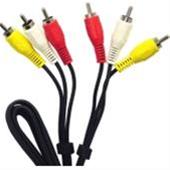
Composite Cables
In Australia telivisions run at 50hz meaning that 50 cycles are completed in 1 second. So half of those are odd and half are even lines. This happens so fast that your eyes perceive it as a constant image. Note also that when the screen is split into rows it is split into colums as well. For normal TVs this is 720 columns. We dont see the difference unless we compare it to 480p.
Enhanced Definition (480p)
Enhanced Definition is also known as 480p. The p stands for progressive. This means that instead of filling the odd fields then even fields this does all the fields consecutively. This equates to a sharper image because we are still running it at 50hz meaning we are refreshing the entire screen 50 times a second.

Component Inputs
Component cables are used with enhanced definition systems. So instead of having 3 wires. Yellow, white and red you have 5. This way the device is able to reserve 3 whole cables for just the transmission of individual colour signals, red, green and blue. They also send saturation, hue and brightness information. Meaning you get a richer picture. Note that your tv has to support component input for component cables to work.
High Definition (720i, 720p, 1080i, 1080p)
High Definition is a whole new beast. Though the Wii does not support high definition I thought it would be helpful to discuss it here.
There are only two main differences between Standard/Enhanced Definition and High Definition. One of them is the number of pixels the TV screen is divided into and the second is the type of interfaces used.
High definition is just that it runs at 720 and 1080 i/p. This means that the TV screen is split into 720 rows and 1080 rows respectively. Meaning higher detail can be achieved. This also means that normal TVs cant support this type of resolution as the maximum they can reach is 480 i/p.
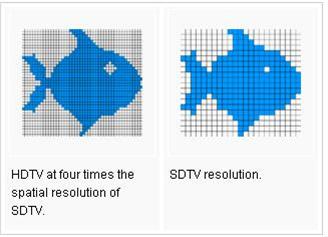
Comparison of high Definition TV to Normal TV - Courtesy of Wikipedia
The second difference is the interface. HD Televisions run via either DVI or HDMI inputs. DVI supports resolutions of upto 1080i. HDMI supports true HD or 1080p. That image of the fish should really help understand how the graphics can be so much sharper and crisp with HD.
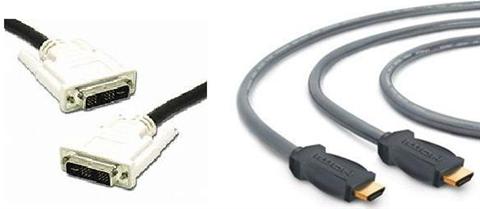
DVI and HDMI Cables
I hope that helped you guys better understand how the different video interfaces work and determine your needs with your future consoles including the Wii.
- by Ravi
 22/11/2006
2125
24
22/11/2006
2125
24
Join MyWii to vote for your favourite story!
More Info:
MyWii - Miscellaneous
Related News:
Related Reviews:
Related Videos:
-

The Heroe's of Gaming - It's Not Easy to be me
-

Sonic Unleashed - Wolf Teaser Trailer
-

Usain Bolt World Record Parody - Celebrating Early
-

cute puppy whistle
-
Shaun White Snowboarding Gameplay Video
-

Rogue Trooper Wii Games Convention
-

Crash Bandicoot: Mind Over Mutant Gameplay Video
-
Zelda Ocarina of Time - Ganondorf Beat in 17 Seconds!