
Wii Menu


The Wii console will revolutionize how people play games. But more importantly, it will entice new players into the world of video games by offering a variety of entertainment, information and communication channels that add value to the console and make it a device that the entire family can enjoy. The Wii Menu will be the first screen shown on the television, as it easily integrates itself as part of people's everyday lives.
Check Mii Out Channel


The Check Mii Out Channel can be downloaded for free from the Wii Shop Channel.
In the Check Mii Out Channel, you can submit, exchange or browse Miis posted by others. The contest section of the Check Mii Out Channel challenges users to submit Mii creations to represent a specific person, character or theme. Users can then vote on Miis submitted by others to determine the Mii that best fits the challenge.
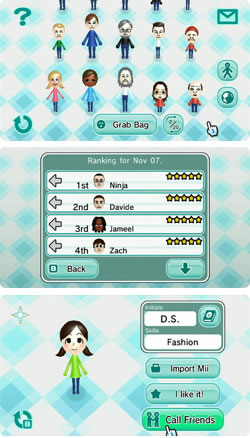
Posting Plaza
In the Posting Plaza, you can submit, exchange or just browse Miis posted by others in your region or worldwide.
You have a variety of ways to search for specific Miis, including by the name of its creator or by a number specific to each Mii. You can tag your favorites, browse for popular Miis and import them to your own Wii system.

Mii Artisan Rank
As the Mii you posted gains in popularity, your Mii Artisan Rank will go up.
Contests
In Contests, you can enter a Mii you created for a specific contest theme. You can judge Miis created by others, and others can judge your Mii. Contests can be enjoyed by most anyone, whether it's your first time creating a Mii or you are confident in your well-established, Mii-creating skills.
Judgment capability
When Contest results are announced, you can see whether you were able to select the Mii that best fit the theme.
Mii Channel


Fun 3-D caricatured portraits of players, or Miis, created in this channel can be used as characters across a variety of Wii software. In addition to storing Miis on the Wii, several Miis can be stored in your Wii Remote and taken to a friend's house to play on another Wii console. Each member of your family can have his or her Wii Remote personalized with their own Mii.
Miis pop up in the strangest of places -- from Wii Sports to WarioWare: Smooth Moves to Wii Play, Miis make their way into games where you'd least expect them. This site will teach you how to make awesome Miis, and how to exchange them with your friends over your Wii console.
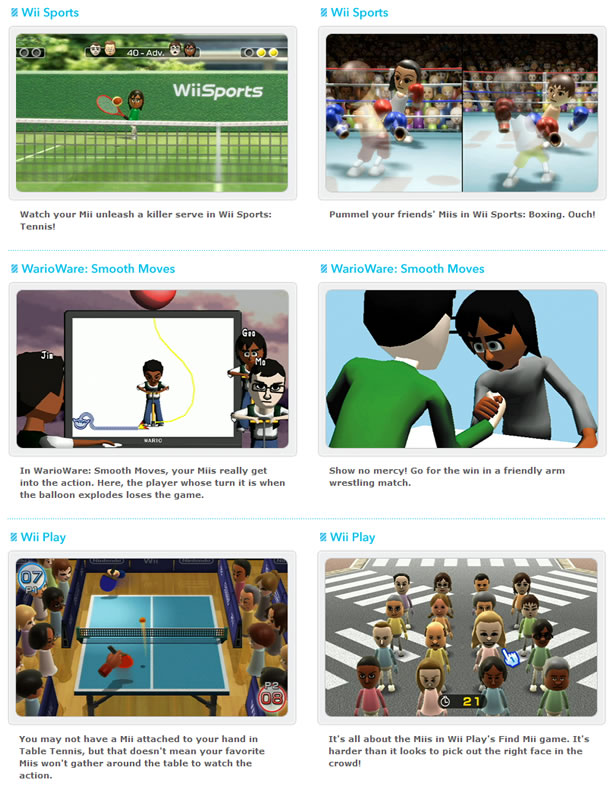
Mingling Mii's!
After you've made a few Miis, you'll want to share them with your friends. It's fun to send your favorite Miis over the Wii console, and it's even more fun to turn on the Mii Channel and find a new batch of Miis waiting for you. Here are a few ways to spread the Mii love.


If your Wii is connected to the internet, you can share Miis with your friends who own Wii consoles. To share Miis over Wii consoles, you must enter your friend's Wii Number into your Wii, and your friend must do the same with your Wii Number.
When the Wii Numbers have been entered and you've both connected to the internet, select "Wii Friend" from the Mii Plaza menu. Then, just drag a Mii into the envelope and select which friend you'd like to receive your Mii. You can send up to 20 Miis a day! Miis will also travel from your friend's friends, and their friends. The more Wii Friends you have, the more you can mingle with other people.

If you're heading over to a friend's house, load up your Wii Remote with Miis and transfer your little pals to your friend's Wii. Each Wii Remote can hold up to 10 Miis.


To make the Miis travel, you need to turn on the WiiConnect24 feature, and you need to register at least one Wii Friend. Then, go to Mii Parade and change the Travel Settings to "Travel." When you do that, your friends' Miis will start to appear in your Mii Parade, and your Miis will eventually appear in your friends' Mii Parade. Be sure to turn each of the Mii's Mingle feature on by selecting "Mingle" under the Mingle option.
Everybody Votes Channel
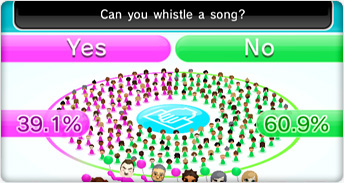

This Channel can only be accessed when the Wii console is connected to the Internet.
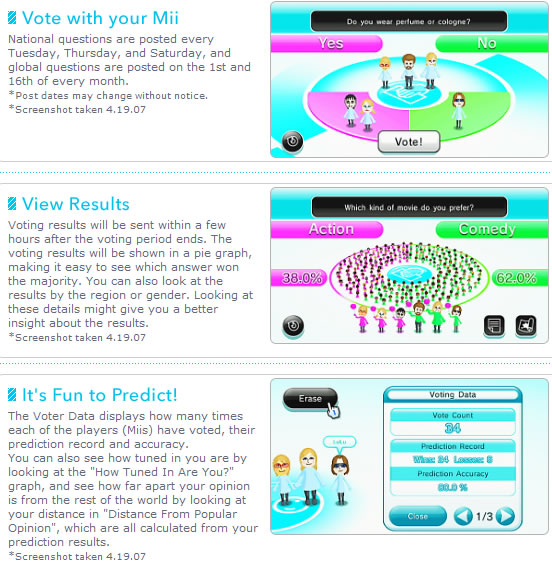
With the Everybody Votes Channel, you can answer popular questions and voice your opinion in national and worldwide polls. Voting is easy for anyone in the family. Simply choose a question you want to answer and select one of the two responses, then come back and see the results. You can even predict which answer will get the most votes and learn how far your predictions differ from other people in the nation.

Using the WiiConnect24 feature, the Everybody Votes Channel lets you select a question from a list, where you can place your votes by selecting between one of the two responses. You then come back to see the results to see if your choice and predictions were the majority. There are National Polls and Worldwide Polls, where you can see whether people in your country think differently from the rest of the world.
 04/01/2008
1539
26
04/01/2008
1539
26
Join MyWii to vote for your favourite story!
Tags:
guide
Menu
Nintendo
Wii
More Info:
MyWii - Miscellaneous
Related News:
Related Reviews:
Related Videos:
-

Reggie Fils-Aime On Violence In Video Games
-

The Reggienator
-
Mario Super Sluggers - Koopa/Bowser Castle
-

Twilight Princess-The Abridged Series: ep 10
-
Mario Kart Wii: Epic Moments II
-

ABC Discusses R18+ Rated Video Games
-

sega megadrive genesis retro handheld LCD console. World 1st
-

New PC Vs. MAC ad very funny!